
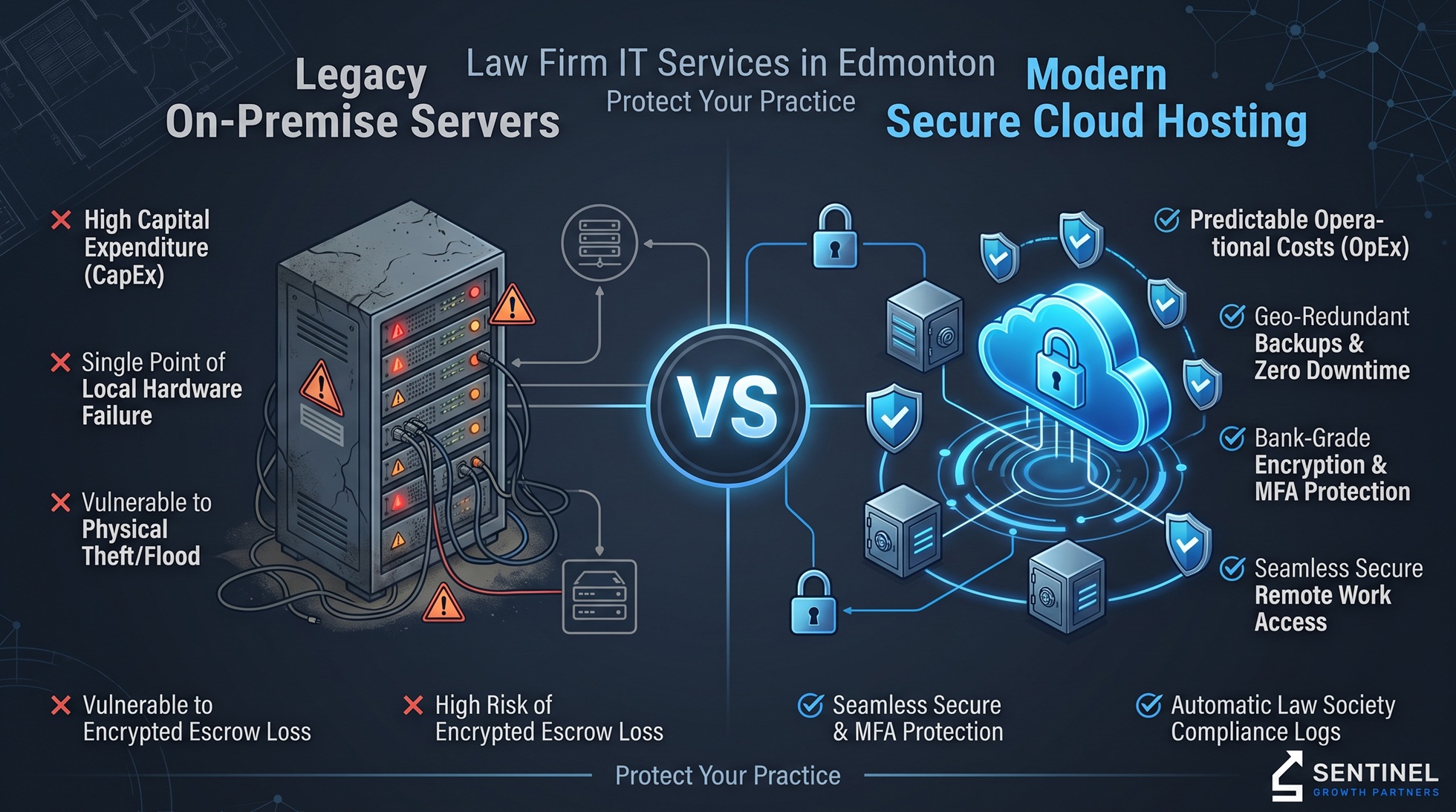
Benefits of Cloud Hosting vs. On-Premise Servers for Law Firms
Managing partners and legal administrators across Alberta face a pivotal technical decision when evaluating legal tech infrastructure: whether to maintain legacy on-premise physical servers or migrate legal management software to a secure cloud environment. Selecting dedicated law firm IT services in Edmonton ensures that your firm maintains strict compliance with the Law Society of Alberta while eliminating unpredictable server maintenance bills.
During comprehensive network audits of Edmonton legal practices, technical teams frequently identify outdated physical server closets running end-of-life operating systems. These on-site server setups often lack localized battery backups (UPS), lack secondary offsite backups, and leave confidential trust account data exposed to catastrophic hardware failure or targeted ransomware attacks.
This detailed guide breaks down the core operational, financial, and compliance differences between physical on-premise hardware and enterprise cloud hosting for Alberta legal practices.
The Legal Compliance Reality: Law Society Guidelines & PIPA
Under the Personal Information Protection Act (PIPA) and rules set by provincial law societies, managing partners bear strict fiduciary responsibility for safeguarding client records, escrow data, and privileged communications.
Key Statutory Requirements for Legal Data Infrastructure
- Fiduciary Data Protection: Attorneys must maintain strict confidentiality. In the event of a breach involving compromised client records or wire transfer fraud, firms face mandatory reporting obligations to the Office of the Information and Privacy Commissioner of Alberta (OIPC).
- Business Continuity & Disaster Recovery: Law practices cannot afford days of billable-hour downtime caused by a blown motherboard or corrupted hard drive array. Continuous, verifiable backups are required to maintain practice continuity.
- Auditability & File Access Tracking: Legal management systems—such as PCLaw, Clio, or Soluno—must preserve strict access logs detailing which employee opened, edited, or exported confidential case files.
Practices seeking to modernize their underlying network can partner with our team for reliable managed IT support in Edmonton.
Side-by-Side Comparison: On-Premise Servers vs. Cloud Hosting
The table below outlines how on-premise server infrastructure compares directly to secure cloud hosting for local law practices requiring specialized law firm IT services in Edmonton.
| Technical Metric | Legacy On-Premise Server Setup | Enterprise Cloud Hosting Architecture |
| Capital Expenses (CapEx) | High initial outlay every 4–5 years ($15k–$30k+) | Zero hardware upfront costs; predictable monthly OpEx |
| Escrow & Trust Data Protection | Dependent on manual local backups and local firewalls | Bank-grade AES-256 encryption with automated offsite vaulting |
| Remote Access Capabilities | Vulnerable, slow VPNs prone to session drops | Secure Zero-Trust Network Access (ZTNA) from any device |
| Disaster Recovery Speed | Days to weeks to source replacement server hardware | Minutes to hours via instant cloud snapshot failover |
| Software Compatibility | High local latency when loading legacy SQL databases | Optimized virtual desktop infrastructure (VDI) execution |
Core Advantages of Cloud Hosting for Legal Practices
1. Eliminating Billable-Hour Losses & Downtime
When an on-premise server fails on a deadline day or during trial prep, legal operations grind to a complete halt. Engineers must source specialized physical replacement parts, rebuild RAID arrays, and restore large databases from local tapes or drives.
Enterprise cloud hosting eliminates single points of hardware failure. By leveraging geo-redundant data centers in Canada, your firm maintains guaranteed uptime, keeping attorneys productive whether working from the courtroom or the office.
2. Safeguarding Trust Accounts & Wire Transfers
Law firms represent high-value targets for wire fraud and spear-phishing campaigns. Hackers specifically hunt for local server vulnerabilities to gain persistent access to email accounts and trust fund authorizations.
Cloud environments enforce strict multi-factor authentication (MFA), automated threat detection, and advanced email authentication protocols (SPF, DKIM, DMARC) to neutralize spoofing attempts before they hit an employee’s inbox.
3. Frictionless Remote Work for Litigators & Partners
Legacy VPN connections to on-premise servers are notoriously slow and prone to corruption when opening large PDF discovery binders or CAD exhibits remotely. Cloud-hosted environments utilize secure virtual desktops and encrypted file streams, enabling legal teams to review case documents instantly from courtrooms, client offices, or remote locations.
To explore advanced perimeter security controls and zero-trust remote access, review our full line of cybersecurity services in Edmonton.
Evaluating Law Firm IT Services in Edmonton for Cloud Migration
Migrating legacy legal management software to the cloud requires a structured strategy to ensure complete data integrity.
The 5-Step Migration Protocol
Step 1: Local Server Audit & File Mapping └─ Identify database structures (PCLaw, Clio, Worldox) and permissions.Step 2: Canadian Data Residency Verification └─ Ensure target cloud infrastructure resides in Toronto or Quebec centers.Step 3: Zero-Trust Access & MFA Deployment └─ Configure conditional access rules restricting unauthorized IP ranges.Step 4: Staged Database Synchronization & Testing └─ Migrate and verify legal management databases off-hours to prevent downtime.Step 5: Cutover, EDR Activation & Staff Training └─ Deploy endpoint protection and train staff on identifying phishing attempts.
- Perform an Infrastructure Audit: Evaluate existing server databases, file directory permissions, and third-party software dependencies.
- Verify Canadian Storage Locations: Ensure the cloud provider contractually guarantees that legal files remain stored exclusively within Canadian borders.
- Implement Role-Based Permissions: Restrict sensitive HR, accounting, and escrow directories so that only authorized partners can access them.
- Deploy Active Endpoint Threat Protection: Install Endpoint Detection and Response (EDR) software on every workstation to block ransomware execution attempts.
- Train Legal Staff: Conduct annual security awareness training to help paralegals and partners spot sophisticated spear-phishing tactics.
To learn more about how our strategic vCIO risk governance helps Alberta practices pass compliance audits and eliminate tech bottlenecks, visit our about page.
Claim Your Free Law Firm IT Security & Cloud Audit
Ensure your firm’s confidential client records and financial workflows are fully protected against hardware failure and cyber threats. Sentinel Growth Partners offers a complimentary, non-invasive 15-Point Cybersecurity & IT Infrastructure Audit tailored for Edmonton legal practices.
Our comprehensive audit evaluates:
- Domain security and email spoofing protections (SPF, DKIM, DMARC).
- Open server port exposure and firewall health.
- Dark web credential scanning for partner and staff email accounts.
- Local server backup health and disaster recovery readiness.
Leave a Reply